Schema Validation
Schema validation is a powerful feature that allows you to validate the response against a JSON schema. The validation can be done without writing any scripting code.
Step 1
- Create a schema file in your workspace.
Step 2
- Save the path of the schema file in the env variable.
- The path can be absolute or relative path to workspace. The relative path will work only if you enabled the setting Save To Workspace.
Step 3
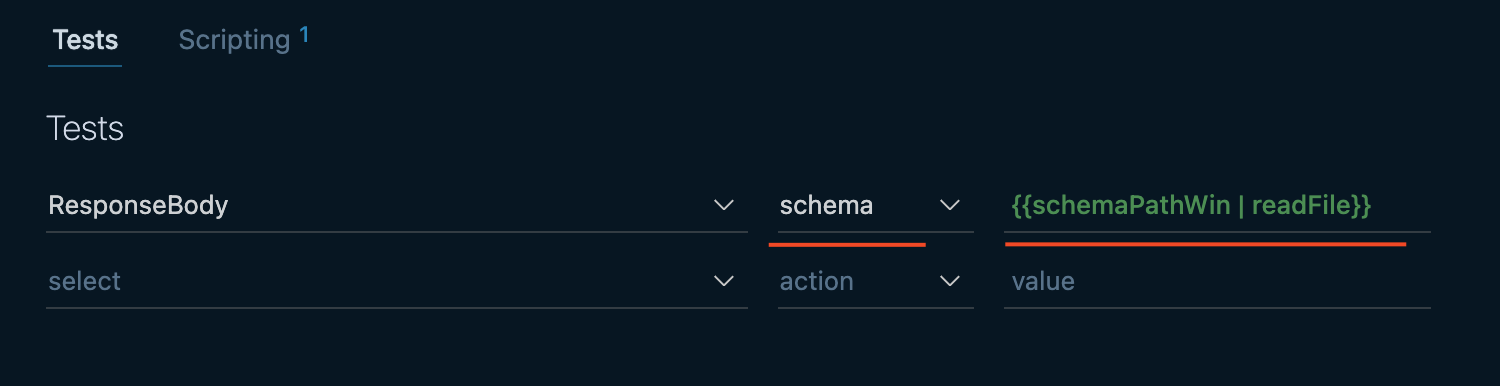
- Select schema dropdown option in the Tests tab and use the readFile filter.
Sample Schema
schema_file.json
{
    "type": "object",
    "additionalProperties": false,
    "properties": {
        "fraction": {
            "type": "number"
        },
        "balance": {
            "type": "number"
        },
        "bignumber": {
            "type": "integer"
        },
        "isNumber": {
            "type": "null"
        }
    },
    "required": [
        "balance",
        "bignumber",
        "fraction",
        "isNumber"
    ],
    "title": "Welcome4"
}
Last updated on